Core ML vs MLX for On-Device LLMs: ANE, GPU, and When Each Wins
MLX runs on-device LLMs on the GPU for throughput; Core ML can place them on the ANE to keep the GPU free — here's how to choose.
Contents
Short answer: Use MLX when raw generation throughput is the priority — it targets the GPU, which gives the best combination of FLOPS and memory bandwidth on Apple Silicon. Use Core ML when you want the model to run efficiently in the background without stealing GPU cycles from your app, since Core ML can place layers on the Apple Neural Engine (ANE). They are not competitors so much as two placement strategies for the same unified memory.
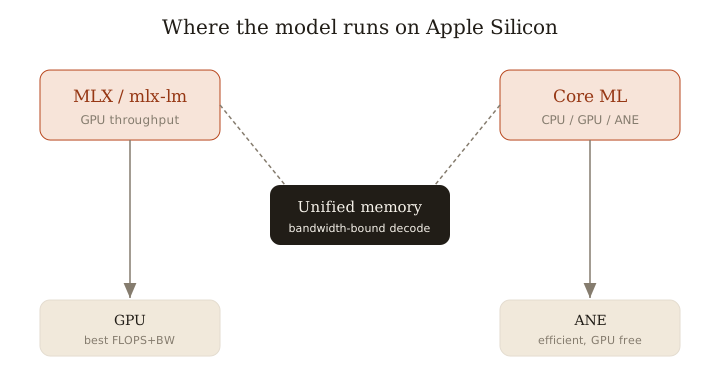
The core trade-off: GPU throughput vs. keeping the GPU free
MLX is Apple's array framework built for the GPU. mlx-lm runs transformer decode on the GPU, and for a memory-bandwidth-bound workload the GPU is the best-provisioned engine on the chip.
Core ML is different. It auto-selects across CPU, GPU, and ANE at load/compile time based on the ops in your model (per Apple's docs). Projects like john-rocky/CoreML-LLM deliberately target the ANE so the GPU stays free for rendering, video, or other ML — a real win if the LLM is one feature inside a graphics-heavy app rather than the whole app.
Why the ANE isn't automatically faster
LLM decode generates one token at a time, and each token requires streaming the entire weight set from memory. That makes decode memory-bandwidth bound, not compute bound. Apple's own analysis of Llama 3.1 8B (machinelearning.apple.com) makes this explicit: it's bandwidth-limited, and the GPU offers the best mix of FLOPS and bandwidth for it.
So the ANE's value proposition isn't peak tokens/sec — it's running at high efficiency (lower power) while leaving the GPU untouched. If you benchmark ANE decode expecting it to beat the GPU, you'll usually be disappointed. If you benchmark it for "runs continuously in the background at low power without dropping the app's frame rate," it wins.
Low-bit quantization in each
Both stacks give you 4-bit, but the mechanics differ.
- Core ML: macOS Sequoia added 4-bit block-wise linear quantization and channel/group-wise palettization. Palettization (weight clustering to a small codebook) is what lets weights sit compactly for ANE execution; block-wise linear quant keeps accuracy up by scaling per block.
- MLX: straightforward 4-bit (and other group sizes) applied at conversion time with
mlx-lm, tuned for GPU kernels.
For most 7–8B models, 4-bit is the sweet spot for fitting in memory and staying bandwidth-friendly on either stack.
Conversion and tooling reality
This is where day-to-day friction lives.
- Core ML path: convert with
coremltools, then integrate natively in Swift. Hugging Faceswift-transformershandles tokenization and the generation loop so you can ship a Core ML LLM in a real Swift app without hand-rolling everything. Conversion can be fiddly — op coverage, fixed vs. flexible shapes, and getting ops to actually land on the ANE all take iteration. - MLX path:
mlx-lmloads and quantizes models with a couple of commands, and the Python/Swift APIs are close to the model code you already know. You ship the MLX runtime with your app rather than relying on the OS framework.
# MLX: quantize + run
mlx_lm.convert --hf-path meta-llama/Llama-3.1-8B-Instruct -q --q-bits 4
mlx_lm.generate --model ./mlx_model --prompt "Summarize:"
# Core ML: convert with coremltools (Python), then load via
# swift-transformers in your Swift app
Decision guide by app type
- Background / always-on assistant (autocomplete, on-device summarization, a passive agent): Core ML → ANE. Efficiency matters and the GPU stays free for the foreground.
- Foreground chat / perf-critical generation (a chat UI where tokens/sec is the felt experience): MLX → GPU. Highest sustained throughput.
- Batch / offline pipeline (embeddings, bulk generation, evals on a Mac): MLX → GPU. You want the GPU saturated; nothing else is competing.
And you can mix: Core ML/ANE for the always-on path, MLX/GPU for the moment the user hits "generate."
Bottom line: pick MLX for throughput on the GPU, Core ML for efficient background inference that frees the GPU — and use both when your app needs each.
Related: more writing.
Frequently asked
- Does the ANE make LLMs faster?
- Not necessarily faster than the GPU — decode is memory-bandwidth bound. The ANE's value is running efficiently while leaving the GPU free for your app.
- Can Core ML run 4-bit LLMs?
- Yes. macOS Sequoia added 4-bit block-wise linear quantization and channel/group-wise palettization to Core ML.
- Which is easier to ship in a Swift app?
- Core ML integrates natively via coremltools and Hugging Face swift-transformers; MLX ships its own runtime but gives higher GPU throughput.
- Can I use both Core ML and MLX?
- Yes — Core ML/ANE for always-on background tasks and MLX/GPU for perf-critical foreground generation in the same app.
Keep reading
Get new essays by email
Occasional field notes on production RAG and LLM systems. No spam, unsubscribe anytime.