Why Payload Filtering Is Qdrant's Killer Feature (and How Filterable HNSW Actually Works)
Qdrant applies payload filters during HNSW graph traversal, not after — so filtered queries stay fast and always return a full top-k.
Contents
Short answer: Qdrant applies payload filters during HNSW graph traversal rather than after it, so the search skips non-matching points as it walks the graph and still returns a full top-k of valid results. This "filterable HNSW" avoids both the broken results of post-filtering and the full-collection scans of naive pre-filtering — but only if you have a payload index on the field you filter, otherwise every filtered query scans all points in the collection.
I run a Qdrant-only search pipeline in production (dish and restaurant search over hundreds of thousands of vectors), and payload filtering is the single feature that lets me collapse what used to be a multi-stage BM25 + SQL + fusion pipeline into one call. Here is why it matters and where it bites.
The problem: post-filtering breaks top-k, pre-filtering full-scans
There are two obvious ways to combine a vector search with a metadata condition, and both are bad.
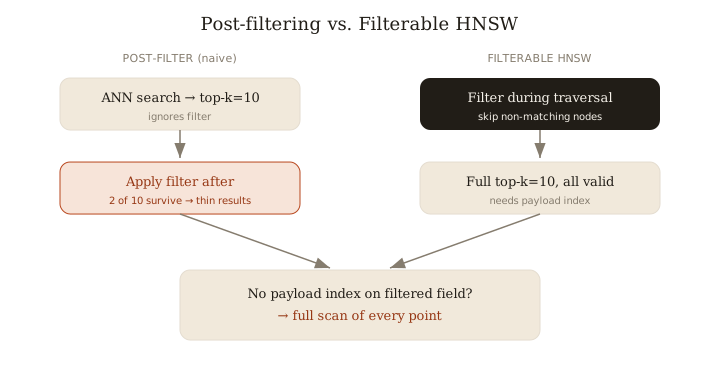
- Post-filtering: run ANN for top-k, then throw away results that fail the filter. If you ask for 10 and only 2 match your
category = "wine"condition, you get 2. To reliably fill 10 you have to over-fetch (top-200? top-1000?) and hope — which is slow and still not guaranteed. - Pre-filtering by brute force: compute the filter set first, then exhaustively score every matching vector. Correct, but it degrades to a linear scan and throws away the whole point of an ANN index.
Neither gives you "k valid matches, fast." That is the gap filterable HNSW fills.
How filterable HNSW works
Qdrant builds its HNSW index so that graph traversal respects filter conditions. During the greedy search through the graph layers, candidate nodes that fail the filter are skipped, and traversal continues through neighbors — so the walk stays inside the subgraph of matching points. Per Qdrant's docs, filterable HNSW builds indexes that respect filters, avoiding scanning tons of post-search results.
The practical consequence: the filter is not a post-processing step and not a separate pass. You ask for top-10 with a must condition and you get 10 matching neighbors (assuming that many exist), with the index still doing sublinear work. Top-k stays intact.
Payload indexes must exist first
This is the part people miss. Filtering on a payload field is only cheap if that field has a payload index. Without a keyword payload index, every filtered query scans all points in the collection to evaluate the condition — you have effectively opted back into a full scan.
Two rules I follow:
- Create a payload index for any field you filter on with any regularity (
keyword,integer,float,bool,geo,datetime, full-text). - Create payload indexes before uploading data for best results, so the structures are built as points land rather than rebuilt afterward.
Production example: scoping to a tenant or category
The canonical use is a must filter that hard-scopes results to a user, tenant, or category. The vector part answers "what's similar," the filter answers "what's allowed."
client.query_points(
    collection_name="dishes",
    query=query_vector,          # semantic similarity
    query_filter=Filter(
        must=[
            FieldCondition(key="tenant_id", match=MatchValue(value=tenant_id)),
            FieldCondition(key="category",  match=MatchAny(any=["main", "small_plate"])),
        ]
    ),
    limit=10,
)
# Requires payload indexes on tenant_id and category, ideally created before upload.
Note MatchAny for multi-value OR within a field — using several MatchValue conditions ANDs them, which is a common footgun for multi-category or multi-cuisine filters.
Cardinality gotcha: the full-scan fallback
Filterable HNSW is not free at every selectivity. Qdrant estimates the cardinality of the filter and, when a filter is very selective (matches only a tiny fraction of points), it can decide the HNSW subgraph is too sparse to traverse efficiently and fall back to a plain filtered scan of the matching points instead. That is usually the right call — scanning 50 points beats wandering a fragmented graph — but it means latency depends on your filter's cardinality, not just collection size. Watch tail latencies on your most selective filters, and tune the payload index / HNSW payload settings if a hot path lands in that regime.
Payload filtering is Qdrant's killer feature precisely because the filter lives inside the index — but that only holds when the payload index exists, so build it before you load.
Related: more writing.
Frequently asked
- What is a payload in Qdrant?
- Arbitrary JSON metadata attached to each vector point that you can filter and index on.
- Do I need a payload index?
- Yes for any field you filter on frequently; without it, filtered queries full-scan the entire collection.
- Can filters break top-k results?
- Not with filterable HNSW — filters are applied during graph traversal, so you still get k valid matches instead of a thinned-out list.
- Which payload types are indexable?
- keyword, integer, float, bool, geo, datetime, and full-text, among others.
- Why does a very selective filter sometimes get slow?
- Qdrant may fall back to a plain filtered scan when a filter matches so few points that HNSW traversal isn't worthwhile; latency then tracks filter cardinality.
Keep reading
Get new essays by email
Occasional field notes on production RAG and LLM systems. No spam, unsubscribe anytime.