The OpenAI Batch API: When 50% Cheaper Tokens Are Worth the 24-Hour Wait
Use the OpenAI Batch API for non-real-time bulk jobs to get 50% cheaper tokens with a 24h SLA and a separate rate-limit pool.
Contents
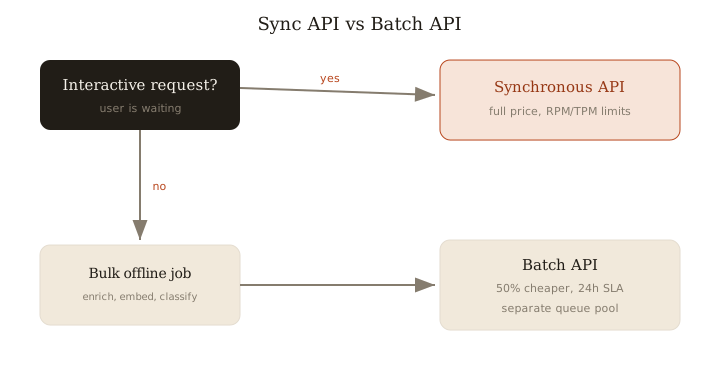
Short answer: Use the OpenAI Batch API for any non-real-time, bulk workload where nobody is waiting on the response — it gives you 50% lower token cost with a 24-hour turnaround SLA and runs against a separate rate-limit pool that doesn't touch your synchronous RPM/TPM. If a user is actively waiting on the output, use the synchronous API; for everything else offline, Batch is almost always the right call.
What Batch is good for
Batch shines whenever the work is large, repetitive, and tolerant of latency. The sweet spots:
- Dataset enrichment — tagging, summarizing, or extracting structured fields across a large corpus.
- Offline classification — routing, moderation labels, sentiment, or taxonomy assignment over historical data.
- Embeddings backfills — vectorizing an entire table or re-embedding after a model change.
- Evals — running a fixed prompt suite against thousands of cases.
- Synthetic data and content generation — bulk generation where throughput matters more than per-item latency.
The common thread: it's a job, not a conversation. Content generation, classification, and data extraction are the canonical fits.
Cost and rate-limit mechanics vs synchronous
Two things make Batch worth the wait:
- 50% cheaper tokens. Same model, same quality, half the input and output token price. On a million-row enrichment job, that's the difference between a $400 run and an $800 one.
- A separate queue pool. Batch has its own limits, independent of your synchronous RPM/TPM. This matters more than the discount for some teams: you can push a massive backfill through Batch without starving your production traffic of rate-limit headroom. Your live API keeps its full budget.
The cost is latency. The SLA is up to 24 hours — jobs often finish much faster, but you must design for the worst case. If your pipeline can't tolerate a day of delay, Batch is the wrong tool.
Job structure, polling, partial failures, and idempotency
A Batch job is a JSONL file. Each line is one request with a custom_id you assign, plus the same body you'd send synchronously. You upload the file, create the batch, then poll for completion.
{"custom_id": "dish-8842", "method": "POST", "url": "/v1/chat/completions", "body": {"model": "gpt-4o-mini", "messages": [{"role": "user", "content": "Classify: ..."}]}}
{"custom_id": "dish-8843", "method": "POST", "url": "/v1/chat/completions", "body": {"model": "gpt-4o-mini", "messages": [{"role": "user", "content": "Classify: ..."}]}}
Things that will bite you if you skip them:
custom_idis your join key. Output order is not guaranteed and results come back in a separate file. Map results back bycustom_id, never by position.- Partial failures are normal. A batch can complete with some lines errored (rate hiccups, malformed bodies, content filters). You get both an output file and an error file. Always read both.
- Make retries idempotent. Key your writes on
custom_idso re-submitting the failed subset can't double-write. Persist which IDs succeeded before retrying. - Split very large jobs. Keep files within the per-batch size/line limits and shard the rest; smaller batches also fail more gracefully.
A real workflow: an embeddings backfill
Here's the shape I use for a large enrichment or embeddings backfill:
- Snapshot the work set. Query the rows needing processing and freeze their IDs. This is your source of truth for what "done" means.
- Generate JSONL, one line per row,
custom_id= the row's primary key. - Upload and create the batch. Record the batch ID in your own tracking table alongside the ID set.
- Poll on a cron, not a tight loop — every few minutes is plenty given the 24h SLA.
- On completion, reconcile. Parse the output file, write results keyed by
custom_id, mark those rows done. Parse the error file, collect the failed IDs. - Re-batch the failures. Because writes are idempotent and keyed by ID, resubmitting only the failed subset is safe and cheap.
This is exactly how I ran a large recipe-linking enrichment and a full Qdrant embeddings re-sync: the separate queue pool meant the backfill never touched production search latency, and the 50% discount roughly halved the bill. The 24-hour SLA was a non-issue because nothing downstream was waiting in real time.
Rule of thumb: if no human is blocked on the output, batch it — half the cost and free rate-limit headroom are worth a day of patience.
Related: more writing.
Frequently asked
- How much does the OpenAI Batch API save?
- 50% versus the synchronous API for the same model — half the input and output token cost.
- What's the catch?
- An SLA of up to 24 hours, so it only fits non-interactive workloads where no one is waiting on the result.
- Does batching count against my rate limits?
- No. Batch uses a separate, higher-limit queue pool independent of your synchronous RPM/TPM, so backfills don't starve production traffic.
- What jobs fit Batch best?
- Embeddings backfills, dataset enrichment, offline classification, eval runs, and bulk content or synthetic-data generation.
- How do I match Batch results back to inputs?
- By the custom_id you set on each request line — output order isn't guaranteed and results arrive in a separate file, so never map by position.
Keep reading
Get new essays by email
Occasional field notes on production RAG and LLM systems. No spam, unsubscribe anytime.