Layout-Aware vs VLM Parsing: When to Pay for a Vision Model to Read Your PDFs
Use VLM parsing for scanned, complex, or merged-cell PDFs; use layout parsers for clean digital docs to save cost and latency.
Contents
Short answer: Reach for a vision-language model (VLM) parser when your PDFs are scanned, contain handwriting, or pack dense/merged-cell tables and multi-column layouts a rule-based parser mangles. For clean, digital, well-structured PDFs, a layout-based parser matches VLM accuracy at a fraction of the cost and latency — so default to layout parsing and escalate to a VLM only where it earns its keep.
The two paradigms
Layout parsers run specialized detection models over the page: text/line extraction, table detection, reading-order, OCR only where needed. Marker, for example, avoids token generation entirely with a 5-stage pipeline of purpose-built models, so throughput stays high and cost scales with page count, not output length.
VLM parsers read each page as an image and generate its structure token-by-token, like any autoregressive model. Per Docling's analysis, this makes them slower and costlier — cost scales with the length of the output they produce, so a table-heavy page that emits thousands of tokens is expensive on every single run.
The practical gap: layout pipelines are near-constant cost per page; VLM cost is a function of how much structure the page contains.
Decision tree by document traits
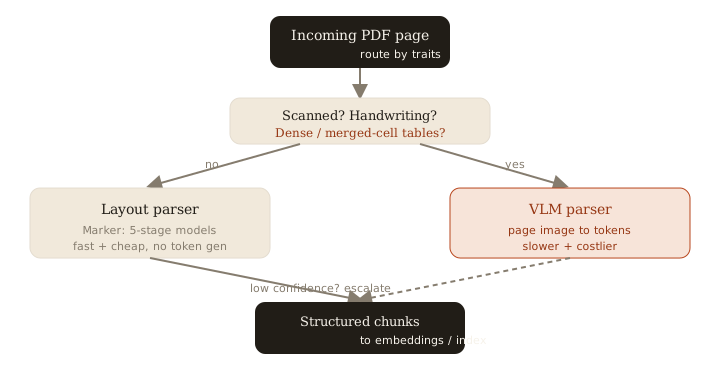
Route by the traits of the actual document, not by vendor hype:
- Digital, single-column, mostly prose → layout parser. VLMs add cost and latency for no accuracy gain here.
- Multi-column academic/newspaper layout → layout parser with good reading-order, or a VLM if columns get interleaved. Note LlamaParse handles embedded images most open-source parsers miss, but it can interleave multi-column text — test reading order on your own files.
- Scanned pages / photos of documents → VLM (or layout parser with strong OCR). Image-native input is exactly what VLMs are built for.
- Dense or merged-cell tables → VLM. Rule-based table detection routinely splits or merges cells wrong; a VLM reasons about the visual grid.
- Handwriting → VLM, with validation. It beats rule-based tools, but accuracy is document-dependent — never ship it unvalidated.
Cost and latency: token generation vs detection
The core economic difference is generation. A detection pipeline like Marker classifies and extracts regions with fixed-cost model passes. A VLM must write out every heading, cell, and paragraph one token at a time. On a 40-row financial table, that is thousands of output tokens — multiply by page count and corpus size and the bill diverges fast.
This is also why VLM latency is unpredictable: a sparse page returns quickly, a dense one stalls on long generation. Layout pipelines have far tighter latency variance, which matters if parsing sits in a user-facing ingestion path.
Hybrid routing: cheap first, escalate the hard pages
The best production setup rarely picks one tool globally. Run a fast layout parser on every page, then escalate only low-confidence or structurally hard pages to a VLM:
def parse_page(page):
    result = layout_parser.parse(page)          # cheap, fast default
    if result.confidence < 0.75 or result.has_dense_tables \
       or page.is_scanned:
        result = vlm_parser.parse(page)          # pay only where it helps
    return result
Confidence signals worth routing on: OCR/detection confidence scores, table-cell count mismatches, empty-text-with-image pages, and detected reading-order conflicts. This keeps 80–95% of a typical corpus on the cheap path while spending VLM budget precisely on the pages that break rule-based parsing.
Default to layout parsing; escalate to a VLM only for scanned, handwritten, or table-dense pages where it measurably beats the cheaper path.
Related: more writing.
Frequently asked
- Are VLM parsers always more accurate?
- On complex or scanned layouts often yes, but on clean digital PDFs a fast layout parser matches them at a fraction of the cost and latency.
- Why are VLM parsers slow and costly?
- They read the page as an image and generate its structure one token at a time, so cost and latency scale with how much output the page produces — dense tables get expensive.
- Can I mix both approaches?
- Yes, and you usually should. Run a cheap layout parser first and escalate only low-confidence, scanned, or table-dense pages to a VLM.
- Do VLM parsers handle handwriting?
- Better than most rule-based tools, but accuracy varies by document — validate on your own samples before relying on it.
Keep reading
Get new essays by email
Occasional field notes on production RAG and LLM systems. No spam, unsubscribe anytime.