On-Device OCR for RAG: Apple Vision vs Tesseract for macOS Document Pipelines
On macOS, Apple Vision beats Tesseract for RAG ingestion — faster, more accurate on real scans, free, offline. Tesseract wins on Linux CI.
Contents
Short answer: On macOS, use Apple's Vision framework (VNRecognizeTextRequest). In practice it is faster, more accurate on real-world scans, and much less finicky than Tesseract — with no per-page fees, no network calls, and full on-device privacy. Keep Tesseract as your Linux/CI fallback and for languages or tuning Vision doesn't cover.
I've run both engines through document ingestion for a RAG system, and the gap on messy real-world scans is not subtle.
The lead: Vision just works on macOS
The consensus among practitioners (and my own experience) matches the common HN refrain: Apple Vision is "fast, accurate, and much less finicky" than Tesseract. Tesseract has been developed since 2006 and is genuinely good, but it needs careful preprocessing — deskewing, thresholding, DPI normalization — before it stops producing garbage on real scans. Vision handles skew, mixed fonts, and low-contrast phone photos with almost no babysitting.
You already use Vision daily: macOS "Copy Text from Image" (Live Text) runs VNRecognizeTextRequest under the hood. That's the same engine you get to call from your pipeline.
Neither engine is perfect on documents — both trip on dense tables, multi-column layouts, and handwriting — so plan a correction step either way (see below).
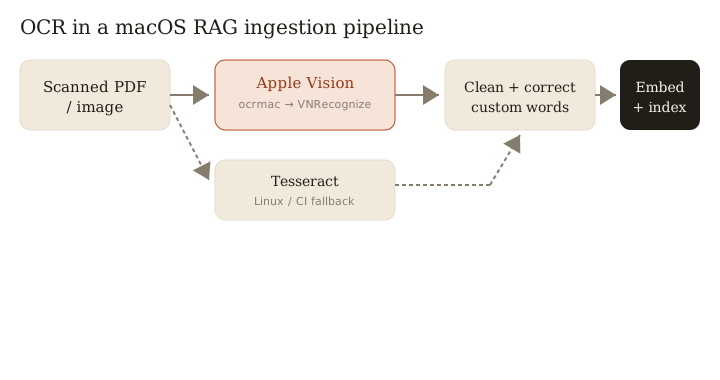
Calling Vision from a Python/FastAPI pipeline
The ocrmac package (PyPI) wraps VNRecognizeTextRequest, so you can stay in Python. Drop it into your ingestion step before chunking and embedding:
# pip install ocrmac  (macOS only)
from ocrmac import ocrmac

def ocr_page(image_path: str) -> str:
    # "accurate" = the slower, higher-quality recognition level
    annotations = ocrmac.OCR(
        image_path,
        recognition_level="accurate",
        language_preference=["en-US"],
    ).recognize()
    # annotations: list of (text, confidence, bbox) tuples
    lines = [text for text, conf, _ in annotations if conf > 0.5]
    return "\n".join(lines)

# In your FastAPI ingest route:
#   text = ocr_page(path) -> clean() -> chunk() -> embed() -> upsert
You get bounding boxes and per-line confidence for free, which is useful for filtering junk and for reconstructing layout. If you prefer Swift, call VNRecognizeTextRequest directly and shell out from your worker — but ocrmac keeps the whole ingestion path in one language.
Accuracy and cost
The cost story is the easy sell:
- No per-page API fees. Cloud OCR (Textract, Document AI, Vision API) bills per page; at ingestion scale that adds up fast. Vision is free with the OS.
- Runs fully offline. No egress, no rate limits, no vendor outage taking down your pipeline.
- Privacy for sensitive docs. Contracts, medical records, and internal PDFs never leave the machine — often the deciding factor for what you're allowed to process at all.
On accuracy, Vision's "accurate" recognition level consistently needed less cleanup than Tesseract in my runs, especially on photographed and low-quality scans where Tesseract's error rate spikes without preprocessing.
When Tesseract still wins
Vision is macOS-only, and that's the whole catch:
- Linux servers and CI. If ingestion runs in a Linux container or GitHub Actions, Vision isn't available — Tesseract is the pragmatic choice.
- Exotic languages. Tesseract ships 100+ trained language packs; if you need one Vision doesn't support, it wins by default.
- Fine-grained config. Page segmentation modes, character whitelists, and custom
.traineddatagive Tesseract control Vision's higher-level API doesn't expose.
A common pattern: Vision for local/dev ingestion on Macs, Tesseract in the containerized production path — abstract behind one ocr_page() interface so callers don't care.
Improving Vision output before embedding
Whatever engine you use, clean the text before it hits your embedding model — OCR noise degrades retrieval:
- Custom words / vocabulary. Vision accepts a custom-words list; feed it domain terms, product names, and acronyms so they aren't "corrected" into nonsense.
- Language correction. Enable Vision's language-based correction (it's on by default at the "accurate" level) to fix obvious misreads in-context.
- Post-OCR normalization. Strip hyphenation at line breaks, collapse broken tables, and drop low-confidence lines using the confidence scores you already have.
Do this once at ingestion and every downstream query benefits.
Bottom line: on macOS, reach for Apple Vision first and keep Tesseract as your Linux/CI fallback.
Related: more writing.
Frequently asked
- Can I use Apple Vision OCR from Python?
- Yes, via the ocrmac package on macOS, which wraps VNRecognizeTextRequest and returns text, per-line confidence, and bounding boxes.
- Is Vision OCR free?
- Yes — it runs on-device with the OS at no per-page cost and works fully offline, which is ideal for sensitive documents that can't leave the machine.
- Does Vision handle multiple languages?
- It supports many languages and lets you add custom words and enable language correction to improve accuracy on domain-specific text.
- When should I still use Tesseract?
- On Linux servers or CI where Vision isn't available, or for exotic languages and fine-grained config (page segmentation, whitelists, custom traineddata) Vision doesn't expose.
Keep reading
Get new essays by email
Occasional field notes on production RAG and LLM systems. No spam, unsubscribe anytime.