How to debug a RAG pipeline that returns wrong answers
A step-by-step debug order for bad RAG answers — start with the assembled prompt, not the model. Most bugs are retrieval, not generation.
Contents
Short answer: debug top-down, not model-first. (1) Log the exact assembled prompt. (2) Check whether the right chunk was even retrieved. (3) Check it wasn't truncated before the model saw it. (4) Only then blame the prompt or model. You'll usually find the bug at step 2 — most RAG failures are retrieval failures.
The instinct when a RAG answer is wrong is to rewrite the prompt or swap the model. That's step 4 of 4, and it's rarely where the bug is.
The debug order
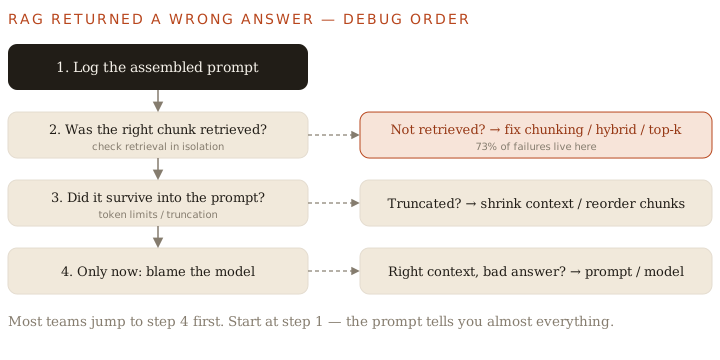
1. Log the assembled prompt
The single most useful thing you can do. Print the exact string sent to the model:
prompt = f"{SYSTEM}\n\nContext:\n{context}\n\nQuestion: {query}"
logger.info("LLM_PROMPT\n%s", prompt)   # do this on every request
answer = llm.chat(prompt)
Reading this one log answers most questions instantly: was the right context there? Missing? Cut off halfway? (This is also why I avoid frameworks that hide the prompt.)
2. Check retrieval in isolation
Run the retriever alone, outside the LLM. Did the chunk that contains the answer come back in the top-k?
- No → this is your bug (and the likeliest one). Fix chunking, add hybrid search, or raise/rerank top-k.
- Yes → move on. The retriever is fine.
3. Check for truncation
The context was retrieved but did it survive into the prompt? Long contexts get silently cut by token limits, and "lost-in-the-middle" means even present evidence can be ignored if it's buried. Shrink the context, reorder so the strongest chunks sit at the edges, or lower top-k.
4. Only now, the model
Right context, present in the prompt, still a bad answer? Now it's a prompt or model problem. Tighten instructions, add a "answer only from context" guardrail, or try a stronger model.
Why this order saves hours
Each step is cheaper and more likely than the next. Jumping to step 4 means you're tuning the model to compensate for a retrieval bug — which "works" for one query and breaks three others. Fix the actual layer.
The rule
Log the prompt, verify retrieval, rule out truncation — then, and only then, blame the model.
Related: why RAG fails in production, production RAG architecture, and more writing.
Frequently asked
- My RAG returns wrong answers — how do I debug it?
- Work top-down: (1) log the exact assembled prompt, (2) check whether the right chunk was retrieved at all, (3) check it wasn't truncated before reaching the model, and only then (4) blame the prompt or model. Most bugs are found by step 2.
- What's the first thing to check when RAG is wrong?
- The final assembled prompt. Log the exact string sent to the model — it instantly shows whether the right context was present, missing, or cut off.
- Is a wrong RAG answer usually the model's fault?
- No. Around 73% of RAG failures are retrieval failures. Rule out retrieval and truncation before you touch the model.
Keep reading
Get new essays by email
Occasional field notes on production RAG and LLM systems. No spam, unsubscribe anytime.