Prompt Versioning in Production: Git vs Prompt Management Tools, and the Eval Gate That Prevents Silent Breaks
Version prompts in Git for small eng teams, move to a prompt tool when non-engineers contribute, and gate every change on an eval suite.
Contents
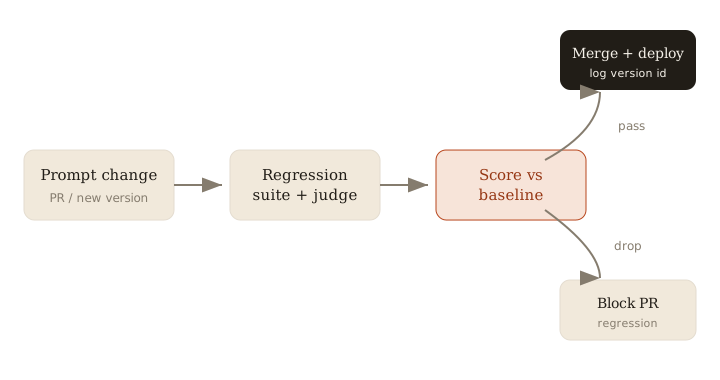
Short answer: Keep prompts in Git if your contributors are all engineers, and move to a dedicated prompt management tool when non-engineers edit prompts or you need to iterate without a code deploy. Either way, the thing that actually prevents production breakage is not the storage backend — it's an eval gate: every prompt change runs a regression suite plus an LLM-as-judge grader against a baseline before it ships, and CI blocks the merge if scores drop.
What prompt versioning is, and why prompts aren't code
Prompt versioning means tracking every change to a prompt as a discrete, addressable version — with a diff, an author, and a way to roll back — the same way you track code. The catch is that prompts don't behave like code. A one-word edit changes model behavior in ways you cannot predict by reading the diff. There's no compiler, no type checker, and the same prompt returns different outputs across runs. A change that looks harmless ("be concise") can quietly wreck a downstream JSON parser or drop a required field on 8% of inputs. That's the silent break: nothing errors, tests are green, and quality degrades in production until someone notices.
So versioning alone is table stakes. The real question is how you evaluate each version before it goes live.
Decision tree: Git-in-repo vs a prompt management tool
Pick based on who edits prompts and how fast you need to ship:
- All contributors are engineers, and a deploy per change is fine → keep prompts in Git, as files in the repo. You get diffs, PR review, blame, and rollback for free. Braintrust's guidance is blunt here: Git works well for solo developers and small engineering teams.
- Non-engineers contribute (PMs, domain experts, support leads) → move to a prompt management system. Git breaks down the moment someone who doesn't know a rebase from a merge conflict needs to edit a prompt. This is the single most common reason teams outgrow Git.
- You need to iterate without a code deploy → also move to a prompt management system. Git couples every prompt tweak to your deploy pipeline; a prompt platform lets you change and roll back a prompt independently of shipping code.
Don't over-adopt. If you're a two-person eng team, a prompt tool is overhead you don't need yet. The trigger to switch is a person (non-engineer editing) or a cadence (no-deploy iteration), not vanity.
The gating pattern that stops silent breaks
This is the part that matters regardless of storage. Hamel Husain and Braintrust both converge on the same three-part gate:
- Versions — every change is an addressable version you can diff and revert.
- A regression suite — a fixed set of representative inputs with known-good expectations (exact-match, schema checks, must-contain/must-not-contain assertions).
- An LLM-as-judge grader — for outputs you can't assert deterministically (tone, faithfulness, helpfulness), a model scores the new output, ideally against a rubric or the baseline version's output.
The judge covers the fuzzy cases; the deterministic checks cover the sharp ones (valid JSON, required fields, no leaked PII). You need both.
Wire the gate into CI
Run the eval suite on every PR that touches a prompt, and fail the check if the aggregate score drops below your baseline. The baseline is the current production version's score on the same dataset.
# .github/workflows/prompt-eval.yml
on:
  pull_request:
    paths: ["prompts/**"]
jobs:
  eval:
    runs-on: ubuntu-latest
    steps:
      - uses: actions/checkout@v4
      - run: python run_evals.py --suite regression --judge llm
        # exits non-zero if score < baseline threshold  -> blocks merge
The point is the non-zero exit. A dashboard nobody looks at doesn't gate anything; a red required check does. Keep the dataset in version control alongside the prompts so the baseline moves with the code.
Rollback and "which version is live"
Two things make incidents survivable:
- Tag the deploy with a version id, and log that id on every request alongside the input and output. When quality dips, you can answer "what changed and when" in one query, and correlate a regression to a specific version.
- Make rollback a one-step operation — revert to the previous version id. In Git that's a revert-and-deploy; in a prompt tool it's repointing an alias. Either is fine as long as you don't have to reconstruct the old prompt by hand.
If you can't currently name the prompt version serving production traffic, fix that before anything else. Observability is what turns a silent break into a five-minute rollback.
Version prompts wherever your contributors live, but never merge a prompt change that hasn't passed an eval gate against a baseline.
Related: more writing.
Frequently asked
- Can I just keep prompts in Git?
- Yes for small engineering teams. Move to a prompt management system when non-engineers contribute or you need to iterate without code deploys.
- How do I stop a prompt change from silently regressing?
- Gate merges on a regression eval suite plus an LLM-as-judge grader, with a baseline threshold that blocks the merge when quality drops.
- How do I know which prompt version is live?
- Store a version id with each deploy and log it on every request, so you can trace behavior and roll back to a known-good version.
- Do I need both deterministic checks and an LLM judge?
- Yes. Deterministic assertions catch sharp failures like invalid JSON or missing fields; the LLM judge scores fuzzy qualities like tone and faithfulness that you can't assert exactly.
Keep reading
Get new essays by email
Occasional field notes on production RAG and LLM systems. No spam, unsubscribe anytime.