How to Choose an Embedding Model and Dimension for Your Vector Database
Pick an embedding model and dimension by trading MTEB quality against RAM, latency, and re-embedding cost — with a decision tree.
Contents
Short answer: Start with a model near the top of the MTEB leaderboard for your language and task, then pick the smallest dimension that holds quality — many modern models let you truncate (Matryoshka) so you cut RAM with minimal recall loss. Match the distance metric to how the model was trained, cache embeddings aggressively, and plan for a re-embedding migration before you commit, because changing models later means rebuilding the whole index.
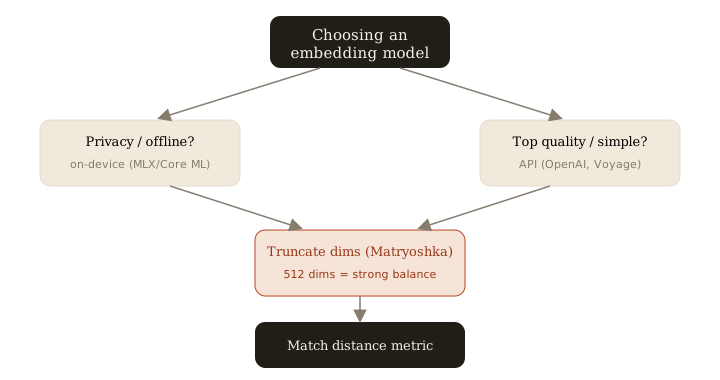
The five decision axes
Every embedding choice is a trade-off across five axes. Rank them for your use case before comparing models:
- Quality — Use the MTEB leaderboard, but filter to the task (retrieval, not classification) and language you actually serve. A model that tops the English average can be mediocre at retrieval.
- Dimension / cost — Dimension drives your RAM bill directly (see below).
- Latency — API round-trips add 50–300 ms per call; local models add GPU/CPU load. Batch and cache to hide it.
- On-device vs API — On-device (MLX, Core ML, sentence-transformers) for privacy, offline, or zero per-call cost; API for top-tier quality and no infra.
- Multilingual — If you serve more than one language, pick a model trained multilingually. Do not bolt translation in front of an English-only model.
Why smaller dimensions usually win
Dimension is the lever most people ignore. The memory math is blunt:
RAM per vector = dimensions x 4 bytes   (float32, before quantization)

1M vectors @ 1536 dims = 1,536 x 4 x 1e6 ≈ 6.1 GB
1M vectors @  512 dims =   512 x 4 x 1e6 ≈ 2.0 GB
That is a 3x reduction in index RAM (and proportionally faster distance computation) for switching from 1536 to 512 dimensions. Matryoshka-trained models (OpenAI's text-embedding-3, Nomic, and others) are explicitly built so the leading dimensions carry the most signal — you can slice a 1536-dim vector down to 512 and lose only a few points of recall.
In production I run OpenAI text-embedding-3-small at 512 dims. It sits at a strong cost/quality point: cheap to generate, small to store, and close enough to the full-dim quality that the gap does not show up in real query results. Benchmark truncated dims on your corpus before trusting any single number.
Match the distance metric to the model — the silent bug
This is the mistake that quietly wrecks retrieval. Every model is trained against a specific similarity objective, and your index must use the same one:
- Cosine — most sentence-embedding models (normalized vectors).
- Dot product — some models expect raw, unnormalized vectors.
- L2 (Euclidean) — less common for text; used by some image/multimodal models.
Use the wrong metric and nothing errors out. Recall just degrades — results look plausible but the best matches sink down the list, and you blame the model or your chunking instead of a one-line config. Check the model card, and if it says "normalize embeddings," either normalize and use cosine, or use dot product on the normalized vectors (they are equivalent then). Verify with a handful of known-good query/document pairs after any change.
Cache embeddings
Embeddings are deterministic for a given (model, text) pair, so never generate the same vector twice. Cache them:
- Query cache — hash the query text; a short TTL (I use 7 days in Redis) covers repeated and popular queries and removes the API round-trip entirely.
- Corpus embeddings — store alongside the source row so re-indexing does not re-bill you.
This cuts both cost and p50 latency, and it makes migrations cheaper because you are not paying twice for unchanged content.
Plan the migration before you need it
Embedding spaces are not compatible across models — or even across dimensions of the same model. If you change models, you must re-embed the entire corpus; a query from the new model cannot be compared against old vectors.
Plan for it up front:
- Store the model name and dimension as metadata on every vector.
- Use a dual-write / backfill pattern: stand up a new collection, backfill it from cached source text, dual-write new content to both, then cut reads over once backfill completes.
- Keep the old collection until you have verified recall on the new one.
Pick the smallest dimension that holds quality, match the metric to the model, and treat re-embedding as a first-class migration — those three decisions matter more than which model tops the leaderboard this week.
Related: more writing.
Frequently asked
- Do more dimensions mean better search?
- Not linearly. Many modern models use Matryoshka training, so you can truncate (e.g. 1536 to 512 dims) and trade a few points of recall for roughly 3x less RAM and faster search.
- Which distance metric should I use?
- Match the model's training objective — usually cosine for normalized sentence embeddings, or dot product for unnormalized ones. The wrong metric silently degrades recall without throwing any error.
- Should I embed on-device or via API?
- On-device (MLX/Core ML/sentence-transformers) for privacy, offline use, and zero per-call cost; API for top MTEB quality and no infrastructure to run.
- What happens if I change embedding models later?
- Vectors are not comparable across models or dimensions, so you must re-embed the whole corpus. Plan a dual-write/backfill migration and store model name plus dimension as metadata on every vector.
Keep reading
Get new essays by email
Occasional field notes on production RAG and LLM systems. No spam, unsubscribe anytime.